

Table of contents
Hiring a full-time receptionist costs between $40,000 and $55,000 per year in salary alone without factoring in benefits, paid time off, training, and turnover.
For many facility and operations managers, that’s a significant line item for a role that still leaves the lobby unattended after hours, during lunch, and on weekends.
The good news is that the alternatives have matured considerably. From part-time staffing arrangements to automated lobby systems, organizations today have more options than ever for managing visitor arrivals professionally without committing to a full-time hire. The right choice depends on your traffic volume, operating hours, security requirements, and budget, but for most modern facilities, there is a better fit than the traditional model.
For most modern facilities, a dedicated full-time receptionist is no longer the only viable option and often not the most cost-effective one.
This guide covers the main alternatives to hiring a receptionist, how they compare, and what to look for when evaluating options for your building.
Why Organizations Are Rethinking the Front Desk
The traditional reception model made sense when buildings operated on fixed hours, visitor volumes were predictable, and the receptionist served as the hub for phones, mail, and visitor coordination. That model has frayed significantly over the past decade, making it worth reconsidering:
- Coverage gaps. A full-time receptionist typically covers one shift, five days a week. That leaves evenings, weekends, holidays, and lunch breaks uncovered — often the moments when a visitor arrives and finds no one at the desk.
- High turnover. Reception is one of the highest-turnover roles in administrative staffing. The cost of recruiting, onboarding, and training replacements adds significantly to the true cost of the position.
- Rising labor costs. Minimum wage increases and tightening labor markets have pushed entry-level administrative salaries higher, making the receptionist role more expensive than it was even five years ago.
- Visitor expectations have shifted. Visitors increasingly expect to be able to check in quickly and independently, similar to the same self-service experience they’re used to in airports and healthcare waiting rooms.
None of this means human reception is obsolete. But it does mean it’s worth evaluating whether the traditional model is the best fit for your facility’s actual needs.
The Main Alternatives to a Full-Time Receptionist
Part-Time or Shared Reception Staff
The simplest alternative is reducing hours rather than eliminating the role. A part-time receptionist covering peak hours typically mid-morning through early afternoon can cut labor costs by 40 to 50 percent while maintaining a human presence during the busiest periods.
Some organizations share a receptionist across multiple tenants in the same building, splitting the cost proportionally. This works well in professional office parks, multi-tenant commercial buildings, and co-working environments.
The limitation is that coverage gaps remain. Visitors who arrive outside scheduled hours still find an empty desk, and the management overhead of coordinating shared staff across tenants can offset the savings.
Best for: low-traffic environments with predictable visitor hours and a modest budget.
Virtual Receptionist Services (Phone-Based)
Virtual receptionist services like Ruby Receptionists or Davinci provide remote agents who answer calls, transfer to the right person, and handle basic scheduling. They’re a popular solution for small businesses and professional services firms that need phone coverage without a full-time hire.
The important distinction: these services handle phone interactions, not physical lobby arrivals. If your primary challenge is managing in-person visitors — signing them in, notifying their host, issuing a badge, handling walk-ins — a phone-based virtual receptionist doesn’t address that need.
Best for: small offices or professional services firms where the front desk problem is primarily about phone handling, not in-person visitor management.
Self-Service Check-In Kiosks
Tablet-based visitor management systems allow visitors to check themselves in, enter their name and purpose of visit, and trigger a notification to their host. These systems create a digital visitor log, which improves on paper sign-in sheets for accuracy and searchability.
The limitation of passive kiosk systems is that they wait for the visitor to initiate interaction. There’s no greeting, no guidance, and no ability to assist a visitor who is confused, looking for wayfinding information, or needs to reach someone they didn’t pre-schedule with. For facilities with consistent, predictable visitor flows, this may be sufficient. For facilities with varied visitor needs or security requirements, it often isn’t.
Best for: high-volume, low-complexity environments where visitors are tech-comfortable and visits are pre-scheduled.
Automated Lobby Systems
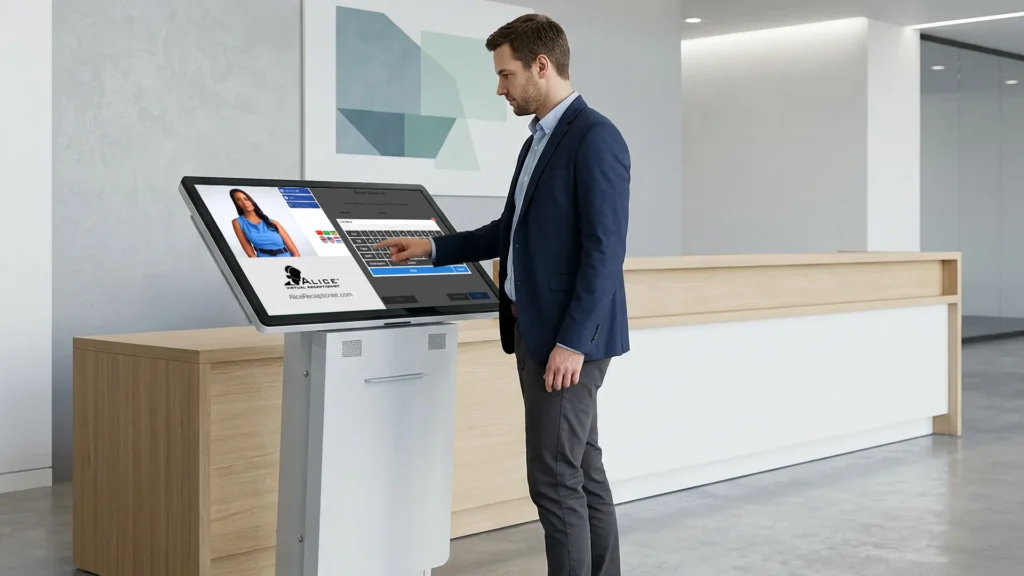
Automated lobby systems represent a newer category that addresses the full front desk function rather than just visitor logging. Unlike passive kiosks, these systems use motion detection to proactively greet visitors, engage them through an interactive AI avatar, and handle the complete range of front desk tasks: visitor check-in, host notification, call routing, badge printing, screening workflows, and wayfinding.
The key differentiator is the proactive, two-way interaction. A visitor who walks in and isn’t sure what to do or who needs to reach someone not listed in a directory can get assistance rather than standing in front of an unresponsive screen. The system can route calls to staff via Microsoft Teams, phone, or other communications platforms, creating a seamless experience that mirrors what a human receptionist would provide.
Best for: facilities with moderate-to-high visitor traffic, extended or 24/7 operating hours, security or compliance requirements, or a need for consistent, professional visitor experience without full-time staffing costs.
What a Full-Featured Automated Lobby System Actually Does
For facilities evaluating automated lobby systems, it’s worth understanding what a full-featured system actually provides because the category varies considerably in capability.
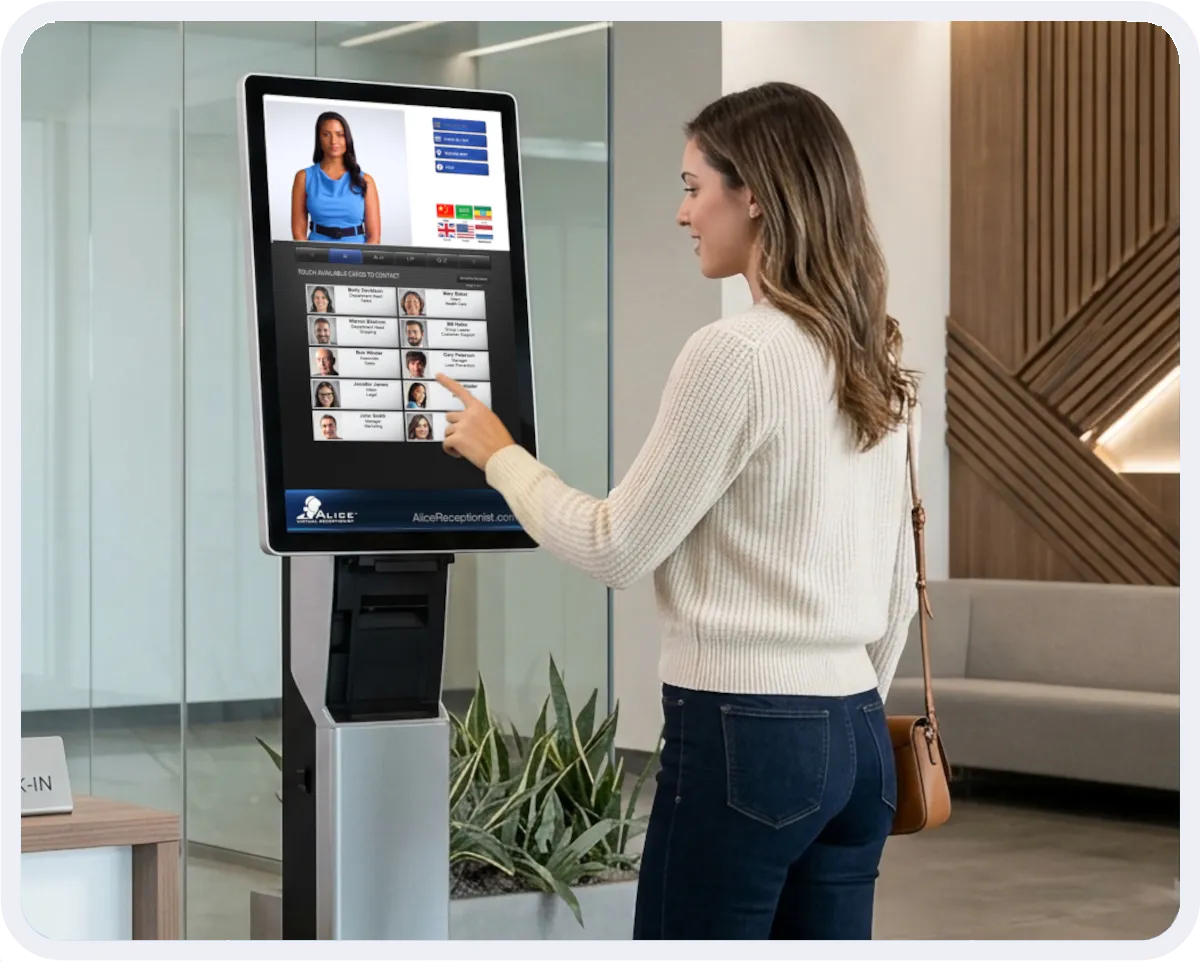
ALICE Receptionist, for example, uses motion detection to identify when a visitor enters the lobby and initiates a greeting through an AI avatar displayed on a kiosk screen. The visitor can then interact through touch to:
- Check in and notify their host via automated message, Microsoft Teams, or phone call
- Receive a printed visitor badge
- Complete screening workflows including NDA signing and questionnaires
- Get wayfinding assistance and building information
- Reach staff via live two-way video or audio call if needed
- Access interpretation for 240+ languages or ASL video interpreting for deaf visitors
Every interaction is logged with a complete, timestamped record, including visitor name, photo, purpose of visit, host notified, and check-out time. This produces the kind of accurate visitor records that compliance audits, security reviews, and incident investigations require.

Book a Demo
Ready to Rethink Your Front Desk?
ALICE Receptionist handles visitor check-in, host notification, badge printing, and call routing without the cost of a full-time hire. See how facilities managers are replacing traditional reception with an automated lobby system that works around the clock.
Schedule a demo to see ALICE in action.
Frequently Asked Questions
How much does it cost to hire a receptionist?
The average full-time receptionist salary in the United States ranges from $35,000 to $50,000 per year depending on location and industry. When factoring in benefits, payroll taxes, paid time off, and turnover costs, the fully-loaded annual cost typically falls between $45,000 and $65,000. Part-time arrangements reduce this cost but introduce coverage gaps. Automated receptionist systems offer the maximum savings without compromising the lobby experience.
Can a kiosk replace a receptionist?
A basic self-service kiosk can handle visitor check-in and host notification, but it doesn’t replicate the full function of a human receptionist. Automated receptionist systems go further by proactively greeting visitors, routing calls, printing badges, running screening workflows, and providing assistance, bringing their capability much closer to what a human receptionist provides.
What Does an AI Avatar Do?
AI avatars assist visitors using pre-programmed messages. Unlike passive check-in tablets, AI avatars proactively greet visitors before they interact with the system and provide instructions on the services available. They handle the full range of front desk functions including check-in, host notification, badge printing, call routing, and visitor assistance.
What should a visitor check-in system be able to do?
At minimum, a visitor check-in system should capture visitor information, notify the relevant host, and maintain a searchable log of all arrivals. More capable systems also print visitor badges, run screening or compliance workflows, integrate with communications platforms like Microsoft Teams, support multiple languages, and provide wayfinding assistance, reducing the need for staff involvement in routine lobby interactions.
Is an automated receptionist right for a small office?
It depends on the visitor volume and operating hours. Small offices with low, predictable visitor traffic and standard business hours may find that a part-time human receptionist or a basic check-in tablet is sufficient. Offices that experience coverage gaps, have after-hours visitors, or want a more professional and consistent experience often find that an automated lobby system pays for itself quickly relative to staffing costs.
See How ALICE Receptionist Works
Ready to see these features in your facility? Book time directly with our team below.

