Wayfinding Kiosk Software for Visitor Check-In
Help Visitors Check-In and Arrive On Time Without Staff Interruption
A single kiosk platform that combines visitor check-in, AI greeting, and indoor wayfinding to reduce confusion, late arrivals, and front desk interruptions.
What Is Wayfinding Kiosk Software?
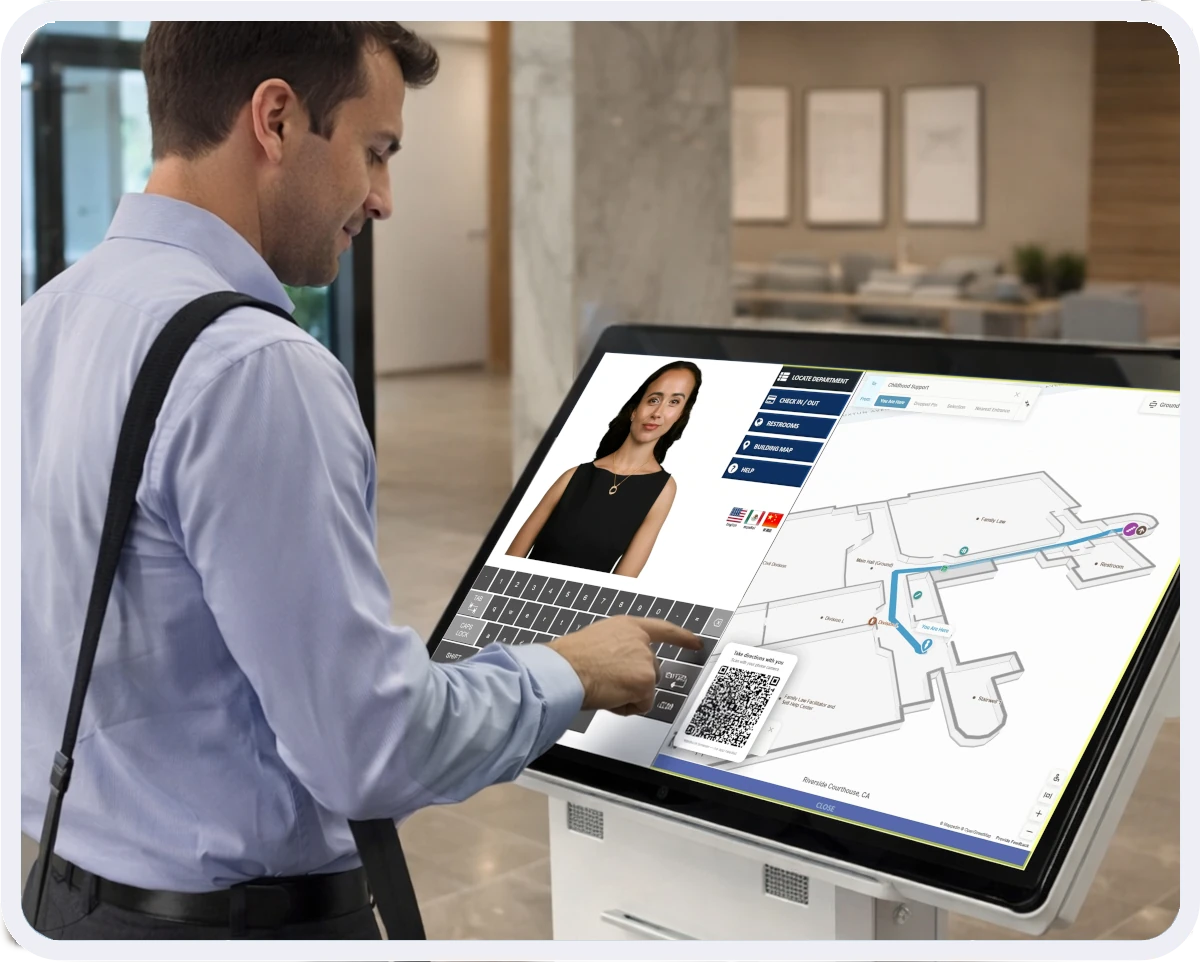
Wayfinding kiosk software helps visitors quickly locate offices, departments, or services within complex buildings using interactive digital maps and turn-by-turn indoor navigation.
Wayfinding maps are built directly into the same kiosk that handles visitor check-in and proactive AI greeting, creating one seamless arrival experience from sign-in to clear directions.
ALICE Receptionist integrates Mappedin, the leading indoor mapping platform trusted by government, healthcare, and enterprise campuses across 86+ countries.
How Wayfinding Kiosk Software Works
One kiosk combines greeting, check-in, wayfinding, and host connection in a single workflow.

Proactive Greeting
An AI avatar greets visitors and provides clear instructions for check-in, contacting their host, or accessing building services.

Visitor Checks-in
Visitors check-in using the visitor management system, automatically printing the visitor’s badge and contacting their host.

Interactive Wayfinding Kiosk
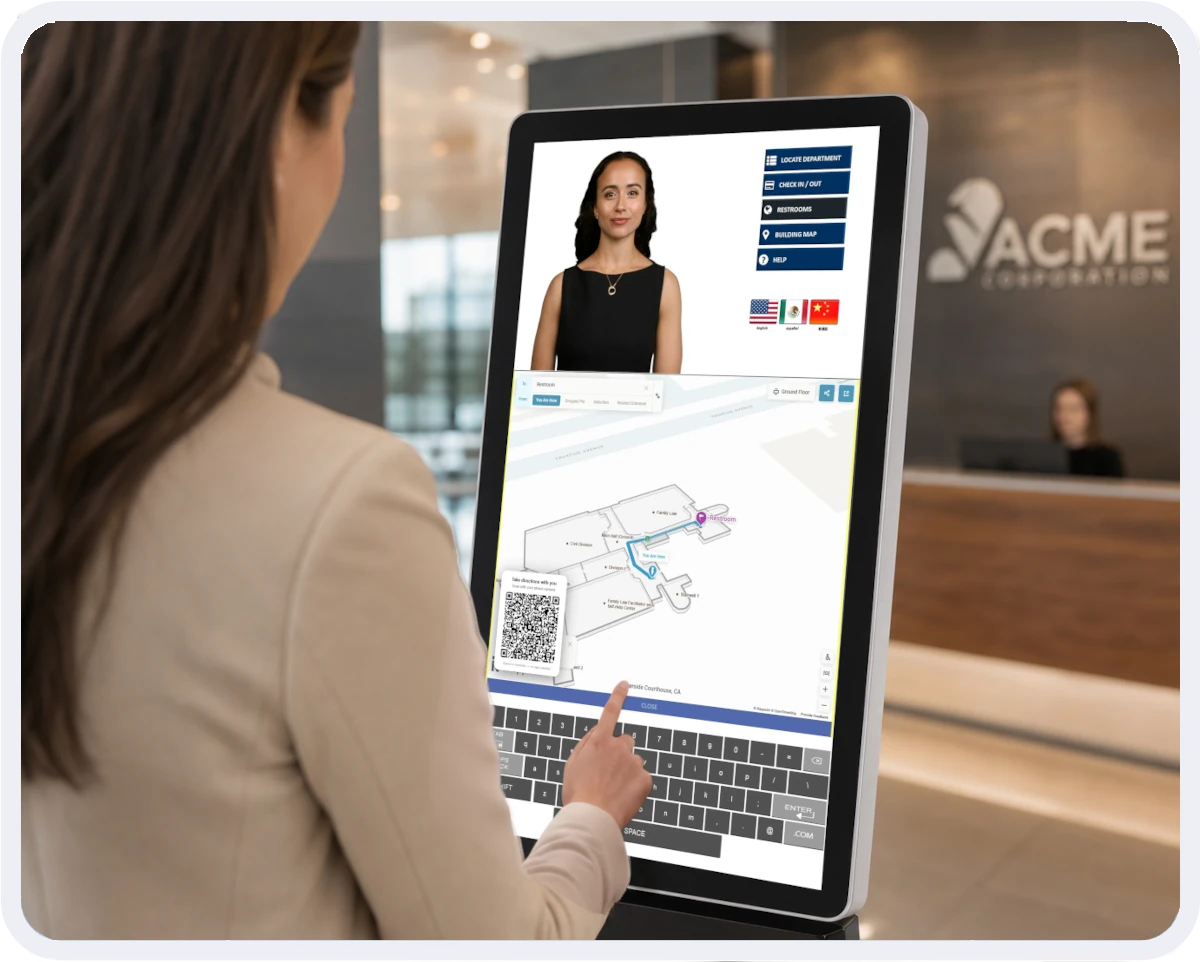
Interactive indoor maps display directly on the ALICE kiosk and can be taken on the visitor’s phone, giving turn-by-turn directions to any office, department, or service.

Connect with Host
Using the indoor map on their phone, visitors can navigate directly to their host’s office or conference room without needing to ask for directions.
One Platform. One Workflow. One Kiosk.
Instead of managing separate systems for greeting, visitor registration, and building navigation, ALICE combines everything into a single kiosk platform.
In addition to viewing the map on the kiosk, visitors can scan a QR code to pull up their directions on their own phone to take with them. Visitors check in then head to their destination with confidence, including ADA accessible routing options.
Maps and floor plans can be updated quickly as your building changes, keeping visitor navigation accurate without delays or disruption to your front desk operations.



“I would highly recommend the ALICE system because we were able to accomplish what we wanted to do and it works perfectly. We’re a highly technical facility and reception is one of the tasks that we’ve automated. It’s been great to have been able to do this.”
– Mike Van Meerten, IT Director, Meissner Filtration Products, Inc.
Benefits of Integrating Wayfinding Kiosk Software with Visitor Management
ALICE brings front desk, check-in and information services under a single, unified kiosk platform.

Streamlined Visitor Guidance
Provide directions using interactive wayfinding kiosks built into your front desk system.

Improved On-Time Arrivals
Reduce missed appointments and delays with intuitive digital routing.

Reduced Staff Interruptions
Empower visitors with information and guidance to let your staff focus on the work that matters.
AI-Powered Indoor Maps
AI mapping converts your floor plans into fully interactive maps, keeping your building navigation accurate as your space changes over time.

Take Directions on the Go
Visitors can scan a QR code at check-in to bring up their indoor map on their own phone, keeping them on track from the lobby to their destination.

ADA-Accessible Routing
The platform supports accessible route options and ADA-compliant indoor navigation, reinforcing ALICE’s accessibility commitment across all visitor types.
Award-Winning Visitor Management Solutions
ALICE Receptionist has been recognized in independent studies, industry publications and customer satisfaction rankings. Click on the award icon below to learn more about these specific awards.




A Trusted Partner in Visitor Management Systems






Book My Demo
See How ALICE Receptionist Integrates Indoor Wayfinding
Book a demo to see how ALICE combines indoor mapping, visitor check-in, and AI greeting into a single front desk platform. One kiosk, one workflow, no extra hardware.
Select a date to schedule your personalized demo.
Frequently Asked Questions
A wayfinding kiosk is a touchscreen system that helps visitors locate destinations within a building using digital directories and maps.
ALICE Receptionist integrates Mappedin‘s wayfinding software, the leading indoor mapping platform trusted by government, healthcare, and enterprise campuses across 86+ countries.
If you use a browser-accessible wayfinding solution, it may also be compatible. Contact our team to confirm compatibility for your environment.
When visitors receive turn-by-turn indoor directions on the same kiosk, they don’t need to ask staff for help. This reduces lobby congestion and repetitive inquiries.
Yes. ALICE supports multi-site deployments with configurable workflows and different indoor maps per location.
Yes. ALICE supports ADA-compliant accessible routing options, helping ensure every visitor can navigate your building independently.
Yes. After check-in, visitors can scan a QR code at the ALICE kiosk to open their indoor map on their own phone, giving them turn-by-turn directions on the go.